Rayhunter LTE PCAP Analysis
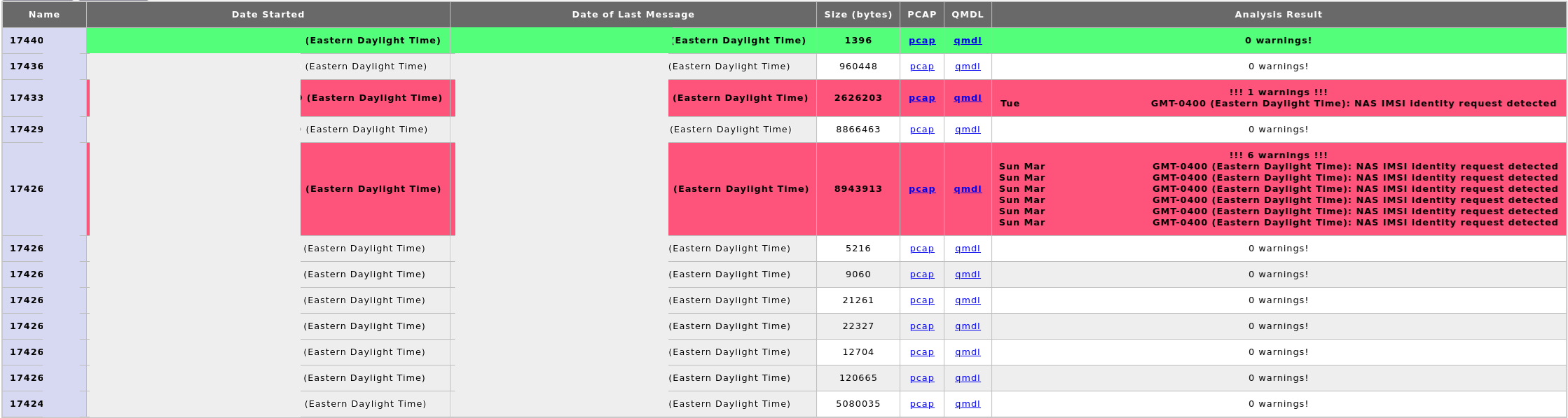
Objective
To analyze cellular network control plane data captured by a Rayhunter device to detect rogue behavior such as IMSI catching or stingray deployments.
Setup
-
Purchase unlocked Orbic RC400LB mobile hotspot.
-
Configure the APN settings if needed
-
The Orbic UI is available on port 80 to any device connected to the hotspot via wifi at http://192.168.1.1 If connected via ADB you can view the portal by forwarding the Orbics port 80 to your local machine via this ADB command:
adb forward tcp:80 tcp:80
-
You can find the portal (wifi network) password by going to the Orbic's menu > 2.4 GHz WIFI Info > Enter > find the 8-character password next to the lock icon.
-
Usage
The Rayhunter UI is available on port 8080 to any device connected to the hotspot via wifi at:
http://192.168.1.1:8080
When connected via ADB you can view the Rayhunter portal by forwarding port 80 (Orbic) to your local machine via ADB:
adb forward tcp:8080 tcp:8080
Note: you will need to install the Android Debug Bridge (ADB) on your computer
Analysis
Review of captured PCAPs after triggering multiple alerts.
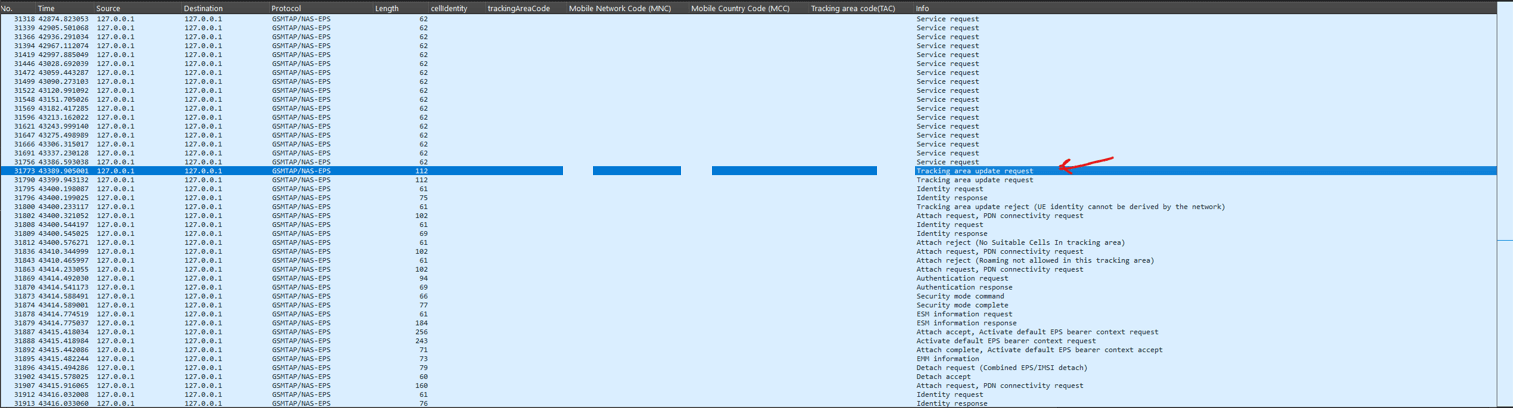
Detectable Indicators
- IMSI Requested
- Tests whether the ME sends an IMSI Identity Request NAS message
- Connection Release/Redirected Carrier 2G Downgrade
- Tests if a cell releases our connection and redirects us to a 2G cell.
- LTE SIB 6/7 Downgrade
- Tests for LTE cells broadcasting a SIB type 6 and 7 which include 2G/3G frequencies with higher priorities.
- Null Cipher
- Tests whether the cell suggests using a null cipher (EEA0)
Observations
- The
GSMTAP/NAS/EPSTracking area update request does advertise the UE Netwrok Capability EEA0 Supported (Null Cipher) value. - Consistent MNC and MMC codes throughout the entire capture duration.
- The Tracking Area Code (TAC) did change as expected.
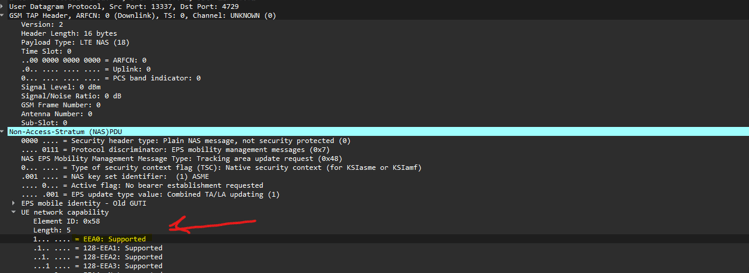
Observed Indicators
-
NAS IMSI identity request
- ME sends an IMSI Identity Request NAS Message to the client
-
Tracking Area Update Request
- UE Netwrok Capability EEA0 Supported (Null Cipher)
Findings
If a NAS IMSI Identity Request contains a UE network capabilities element (Element ID: 0x58, Length: 5) with the bit indicating support for EEA0 set (meaning only the null encryption option is supported), it may be caused by:
- A cell site simulator or stingray attempting to emulate the network but using a simplified or misconfigured implementation that inadvertently (or intentionally) advertises minimal cipher support.
- An intentional downgrade or non-negotiation of encryption parameters by the rogue equipment to force the transmission of IMSIs and other signaling in cleartext.
- A signal that the device is interacting with equipment that does not adhere fully to the standard attach procedures—as would be expected in a genuine network—potentially revealing malicious intent.
These factors combined make such a NAS message an indicator, albeit not definitive proof on its own, that a cell site simulator or similar IMSI-capturing device might be in use.
NAS IMSI Identity Request
The NAS IMSI identity request is a true positive but may be benign.
How it works
A NAS IMSI Identity Request is a standard mechanism in cellular networks (especially in LTE/4G) used when the network needs to explicitly obtain the International Mobile Subscriber Identity (IMSI) from a user device (UE) rather than relying solely on a temporary identifier. Several factors or conditions can trigger such a request.
- Lack of a Valid Temporary Identifier
- Mismatch or Inconsistency in Identification
- Security and Verification Needs
- Network Configuration and Optimization
Why it's an indicator
A NAS IMSI Identity Request isn’t in itself proof of malicious intent, but when seen in unexpected contexts it can be a red flag. In a typical network attach procedure, a subscriber device initially uses a temporary identifier (like a GUTI) assigned by the home network. A legitimate network rarely needs to ask for the permanent IMSI except under special conditions—such as when the temporary identity is missing, expired, or mismatched.
While a single IMSI Identity Request can occur during normal attach procedures when temporary identities fail, repeated or contextually inappropriate NAS IMSI requests raise the possibility that a device is interacting with a non-standard, potentially rogue cell site. Such behavior is characteristic of cell site simulators (stingrays) that deliberately force the disclosure of permanent subscriber information in order to track or intercept communications. Therefore, if a device—or the network logs of an operator—record IMSI requests in situations where they would not normally be expected, it can be indicative of the presence of a stingray or similar IMSI-catching device.
When a cell site simulator (often called a “stingray”) is in use, the following anomalies can occur:
-
Lack of Proper Network Integration
- No Home Network Connectivity
- A stingray operates independently of the legitimate network’s control systems. Without proper synchronization with the home network’s subscriber database, it doesn’t have a valid temporary identifier to offer the UE. As a result, the simulator may force the UE to reveal its IMSI so that it can "register" the device.
- Fallback to IMSI Request
- Because the stingray cannot correctly emulate all aspects of the lawful network’s identity management—particularly the assignment and maintenance of temporary identities—it resorts to sending a NAS IMSI Identity Request to capture the UE’s permanent identity. In a properly functioning network, such a request is rarely needed once the UE’s temporary identity is established.
- No Home Network Connectivity
-
Anomalous Request Triggers
- Unexpected or Frequent Requests
- In normal operation, once a device has been authenticated and assigned a temporary identifier, IMSI requests occur only under exceptional circumstances (e.g., when the temporary ID expires or during certain network handovers). A pattern of IMSI requests appearing in areas or times where they aren’t normally expected could indicate that an entity is deliberately trying to force devices to reveal their permanent identities.
- Unexpected or Frequent Requests
-
Security Implications
- IMSI Catching as a Tracking Method
- Stingrays are known for their role in IMSI catching—collecting subscriber identities to track devices or intercept communications. By forcing a UE to reveal its IMSI, the simulator can compile a list of nearby devices for further surveillance or targeting.
- Interference with Normal Network Procedures
- The deliberate misuse of NAS signaling (such as unsolicited IMSI requests) deviates from how legitimate network equipment is designed to operate. When a network element behaves in this manner, it often suggests that the device is not part of the genuine network infrastructure, but instead is a simulator with surveillance objectives.
- IMSI Catching as a Tracking Method
Null Cipher (EEA0)
In a typical attach or TAU procedure, the network and the user equipment (UE) perform a security mode command procedure. During this process, they negotiate encryption and integrity protection parameters. Normally, a non-null cipher suite is selected to ensure that both the control plane signaling and any sensitive subscriber information (like identity data or location updates) are protected against eavesdropping.
Due to the standardization of cipher suites, it is not suspicious to see a null cipher offered to the client in this context. However, if ONLY a null cipher was offered during the negotiation and would be unusual in a properly secured network.
How it works
The null cipher suite (EEA0) is supported in cellular networks primarily as a fallback mechanism, ensuring interoperability, simplifying testing and debugging, and maintaining compatibility with legacy or specialized systems. Although using EEA0 means that data is transmitted in cleartext—an option that would not be ideal for general secure communication—it provides a necessary, standardized baseline that guarantees a level of connectivity when no other encryption method is viable. This design choice makes it clear that while security is a high priority, the network must also be resilient and flexible in various operational scenarios.
Why it's an indicator
- Incomplete or Non‐Standard Message Construction
- Improper Emulation of Protocol Procedures
- In a correctly implemented LTE network, the NAS IMSI Identity Request is used to prompt the UE for its permanent identifier (the IMSI) when the network has lost the temporary identity context. Typically, UE capability information is sent by the device during its attach procedure—not by the network in an identity request.
- Improper Emulation of Protocol Procedures
Tracking Area Update Request
The Tracking Area Update Request is likely a false positive as noted in the projects source code comments. Once the issue is fixed the QMDL files will be reanalyzed by the system.
// FIXME: our RRC parser is reporting false positives for this due to an
// upstream hampi bug (https://github.com/ystero-dev/hampi/issues/133).
// once that's fixed, we should regenerate our parser and re-enable this
// harness.add_analyzer(Box::new(NullCipherAnalyzer{}));
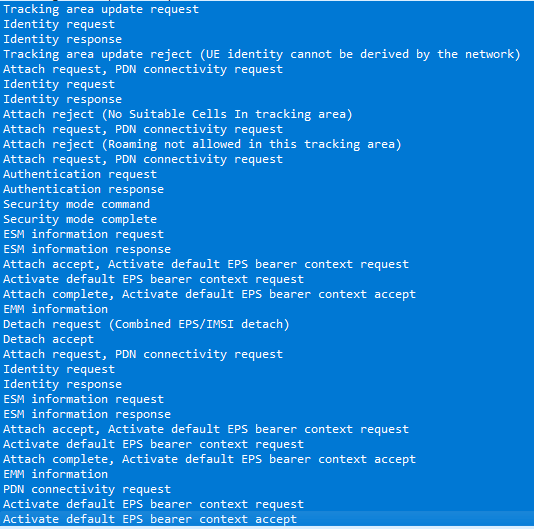
Troubleshooting Bugs
Fixed in version 0.2.6
Due to corrupted QMDL files, the PCAPs were not visible in the Rayhunter UI. The QMDL and PCAPs were extracted manually with the following procedure:
Manually copy the PCAP files from the device via ADB.
adb pull /data/rayhunter/qmdl .
Convert from QMDL to PCAP using tool.
Parse and convert the baseband dump file using SignalCat:
pip install signalcat
scat -t qc -d 'YOUR_QMDL.qmdl' -F PCAP_OUTPUT.pcap
Next Steps
- Continue packet analysis.
- Rayhunter + GPS (wardriving/wiggle)
- In a controlled environment, attempt to trigger a detection.
- Send Rayhunter data captures (QMDL logs) to info@eff.org
Tags: IMSI, Cellular, Android, Wireshark, Networking, Defensive Tooling, Featured
← Back home